
A Modern Guide to Multi Channel Marketing Automation
Multi-channel marketing automation is how you use software to connect and manage customer conversations across different platforms—think email, ads, and in-app messages. It's a huge leap from just sending one-off campaigns. Instead, you create a unified, intelligent system that reacts to what customers do in real-time, making sure their experience feels connected no matter how they interact with you.
What Multi-Channel Marketing Automation Really Means
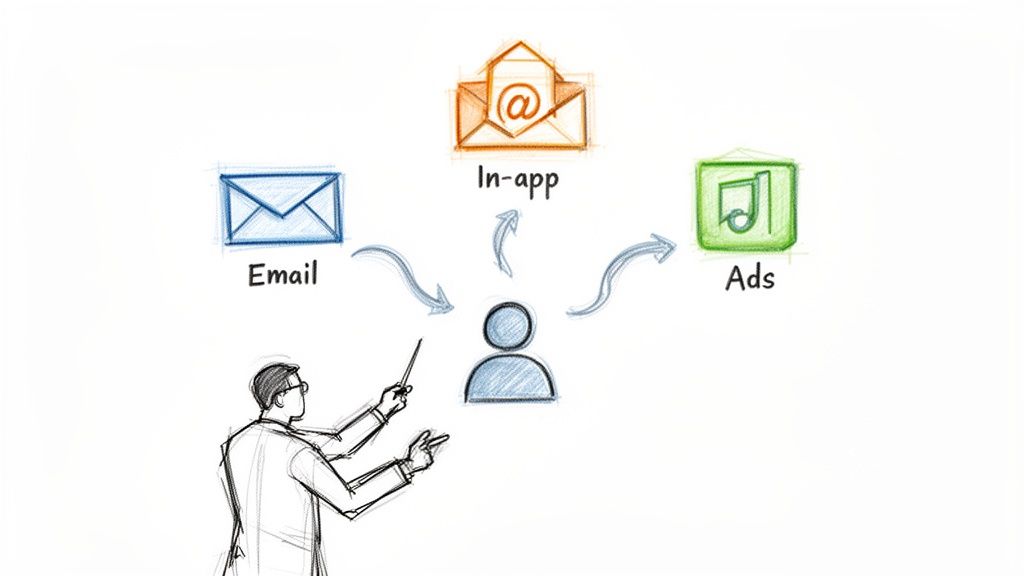
Let's cut through the jargon. Imagine your marketing is an orchestra. Your emails, social ads, and in-app pop-ups are all different instruments. Without a conductor, each one just plays its own tune whenever it wants. The result? A chaotic mess that just sounds like noise to your customer.
Now, think of automation as the conductor. It brings everything together, making sure each channel plays its part at the perfect moment to create a beautiful, cohesive symphony—a seamless customer journey. This turns fragmented interactions into smart, adaptive conversations that actually feel personal and helpful.
The Critical Difference Orchestration Makes
Just showing up on a bunch of channels isn't the goal. That's simply multi-channel marketing, and it usually leads to siloed teams and mixed messages. The "automation" part is what powers true orchestration.
Multi-channel marketing automation isn't about blasting more messages on more platforms. It's about sending the right message on the right platform at the right time, all triggered by what your users actually do.
For any B2B SaaS company, this distinction is everything. Instead of carpet-bombing your entire user base with a generic email, an orchestrated system can:
Trigger an in-app message to help a user who seems stuck on a new feature.
Send a follow-up email with a relevant case study right after they engage with it.
Show them a targeted ad on LinkedIn if they haven't logged in for a week.
This connected experience is how you turn user behavior into tangible growth. And the numbers back it up: businesses that automate across multiple channels generate 80% more leads and see 77% higher conversion rates.
From Manual Effort to an Automated Engine
Without a system like this, your growth team is probably stuck in a painful cycle of manually exporting lists, uploading them to different tools, and just guessing what a customer needs. It's slow, clunky, and creates a terrible user experience. Starting with an email marketing automation guide is a fantastic first step, but a real multi-channel strategy weaves that foundation into every other customer touchpoint.
A platform like SMASHSEND becomes the central engine for all of this, connecting your data and your logic. It listens for signals from your product and CRM, then automatically executes perfectly timed messages across the channels that matter most. This is how small teams build scalable programs that activate users, drive expansion, and ultimately grow the business.
Single Channel vs Multi Channel vs Automated Multi Channel Marketing
To really grasp the power of orchestration, it helps to see how these approaches stack up. Each one represents a different level of maturity in how you communicate with customers.
This table clarifies the key differences between three common marketing approaches, highlighting the strategic advantages of automated multi-channel orchestration.
| Approach | Customer Experience | Data Utilization | Typical B2B SaaS Use Case |
|---|---|---|---|
| Single Channel Marketing | Disconnected. Users only hear from you in one place, like email. | Siloed. Data from one channel (e.g., email opens) is not connected to other behaviors. | Sending a monthly newsletter to all users. |
| Multi-Channel Marketing | Inconsistent. The message on LinkedIn might not match the one in-app, creating confusion. | Fragmented. Data exists in multiple tools but isn't unified, making a single view of the customer impossible. | Running separate email campaigns and social ad campaigns with different messaging. |
| Automated Multi-Channel Marketing | Cohesive & Contextual. The experience feels seamless as users move between channels. | Unified & Real-Time. A central platform uses behavioral data to trigger actions across any channel. | A user ignores a feature-update email, so an in-app tooltip highlights it on their next login. |
As you can see, the leap to an automated, multi-channel approach is less about adding more channels and more about adding intelligence and connectivity between them. This shift is what separates companies that simply send messages from those that build meaningful customer relationships.
Building Your B2B SaaS Automation Engine
A powerful multi-channel marketing automation strategy isn't magic—it's architecture. Think of it like building a high-performance engine for your B2B SaaS. Just like a car engine needs interconnected systems for fuel, ignition, and power, your automation engine has three core layers that work in perfect harmony to turn raw data into revenue.
Getting this structure right is the key to moving beyond simple email blasts. It's how you create a smart system that engages users at every single stage of their journey. Each layer has a distinct job, and when they communicate seamlessly, the result is a responsive, personalized customer experience that actually scales.
The Three Foundational Layers
At its core, any effective automation system is built on three essential components. Nailing these is the blueprint for sustainable growth.
1. The Data Foundation: This is the fuel for your engine. It's where all your customer information lives, combining firmographic details from your CRM with real-time behavioral data from your product. This layer tracks every click, feature adoption, and login, creating a rich, unified profile for every single user.
2. The Logic Engine: This is the engine's onboard computer, constantly processing data and making decisions. It uses triggers, conditions, and workflows to figure out what happens next. When a user's behavior matches a predefined rule—like a trial user inviting a team member—the logic engine fires an action.
3. The Channel Execution Layer: This is where the power meets the road. Once the logic engine decides what to do, this layer delivers the message through the best channel, whether that's an email, an in-app notification, a targeted ad, or an SMS.
Platforms like SMASHSEND act as the central nervous system for this entire structure. We connect these layers so data flows freely and actions are executed instantly, preventing the data silos and disjointed experiences that plague less sophisticated setups.
Connecting the Wires: How Integration Works
For your automation engine to run smoothly, all its parts need to be in constant communication. This is where integrations come in. They are the essential wiring connecting your SaaS product, your CRM, and your marketing platform. Without them, your engine would just stall out.
An automation engine without deep integration is like a car with a full tank of gas but no fuel line. The potential is there, but there's no way to deliver it where it's needed.
There are a few primary ways to make sure your tech stack is perfectly synced:
APIs (Application Programming Interfaces): These are the most robust connections, letting your product and marketing platform speak directly to each other. An API can instantly send an event from your app (like "user upgraded plan") to your automation tool, triggering a celebratory workflow in real-time.
Webhooks: Think of these as lightweight, real-time alerts. A webhook can notify your automation system when a specific event happens, like a payment failing in your billing system. This can instantly kick off a dunning sequence to recover that revenue automatically.
Third-Party Connectors: Tools like Zapier act as universal translators between different apps. They make it easy to link systems that don't have native integrations, ensuring no piece of your customer data is left stranded on an island.
A visual tool, like a drag-and-drop automation flow builder, makes it simple for marketers to map out these complex journeys without needing to write a single line of code. By combining a solid three-layer architecture with seamless integrations, you're not just building a marketing tool; you're building a scalable engine for growth that works for you 24/7.
Orchestrating the B2B Customer Journey
An automation engine gives you the power to do more than just send messages; it lets you architect precise, responsive customer journeys. Instead of blasting the same message to everyone, multi-channel marketing automation allows you to design specific "plays" that trigger based on what a user actually does—or doesn't do.
Think of these not as one-off campaigns, but as interconnected workflows that adapt on the fly. They deliver the right touchpoint on the right channel at exactly the right moment, guiding users toward activation, expansion, and retention.
Let's break down four essential plays that B2B SaaS companies can run to completely transform the customer lifecycle. At the heart of each play are three core components: the data you collect, the logic you define, and the channels you use to communicate.
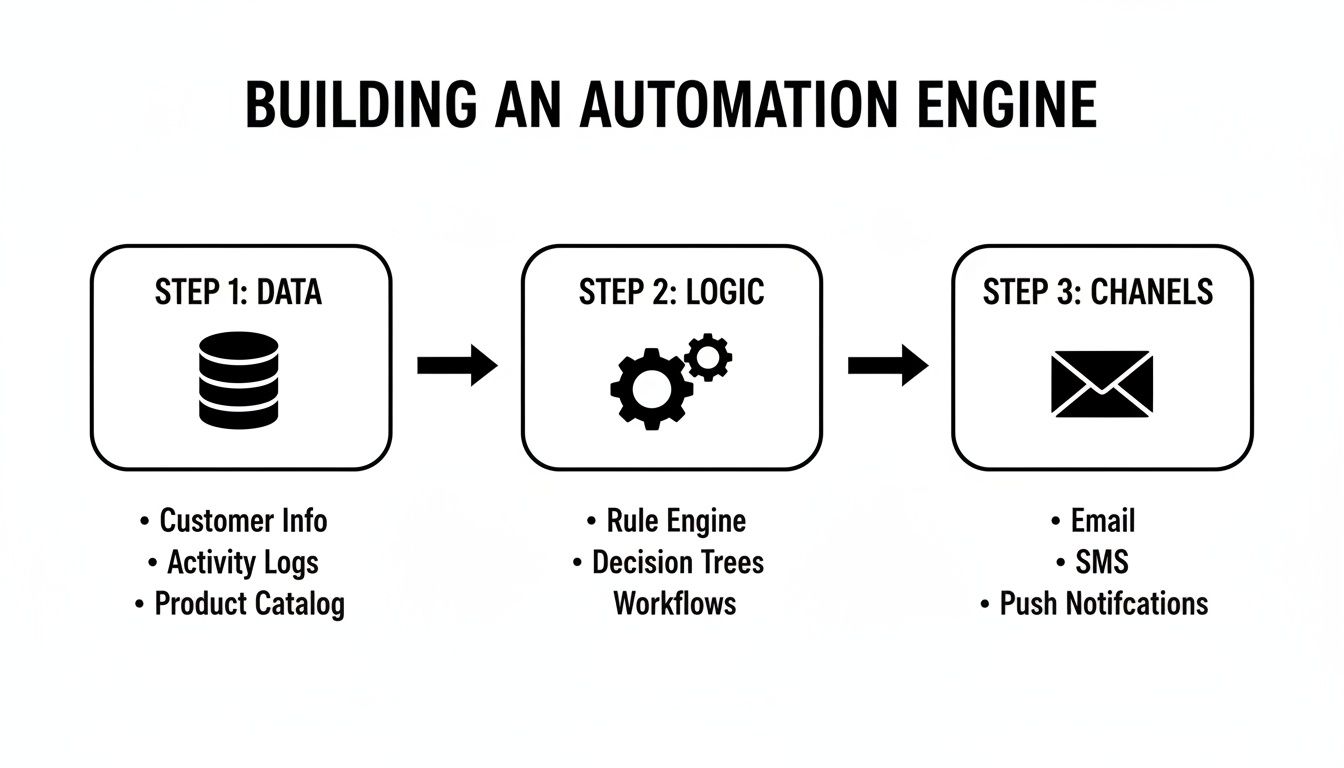
This simple flow is key. Effective orchestration always starts with unified data, is guided by smart logic, and is executed across a symphony of channels.
Play 1: The Activation Workflow
The first 30 days of a user's journey are make-or-break. A killer onboarding experience is what turns curious trial signups into deeply engaged, active users who stick around. The goal here isn't to overwhelm them with every single feature. It's to guide them to their "aha!" moment as fast as possible.
An activation workflow uses a mix of channels to make this happen:
Email: A welcome series can introduce your core value props and share genuinely helpful resources like setup guides or case studies.
In-App Messages: Trigger tooltips or short guides the very first time a user navigates to a key feature. This offers contextual help right where they need it, when they need it.
Targeted Ads: If a user hasn't logged in for a few days, a subtle retargeting ad on a platform like LinkedIn can be the perfect nudge to remind them to come back and finish setting up.
By orchestrating these channels, you create a supportive environment that encourages exploration and drives feature adoption, massively boosting the likelihood that they'll convert to a paid plan.
Play 2: The Expansion Play
Once a user is activated and happy, the next goal is to drive expansion revenue. This could mean getting them to upgrade their plan, add more seats, or adopt a premium feature. The secret is to wait for the right behavioral signals before you make the ask.
A usage-based trigger is the perfect catalyst for an expansion play.
Rather than asking everyone to upgrade, multi-channel marketing automation allows you to make an offer only when it's most relevant—right after a user has experienced the value that warrants a bigger investment.
For example, when an account hits 80% of its user seat limit, a workflow can trigger a helpful, automated email to the account admin suggesting an upgrade. If they ignore it, a subtle in-app notification can pop up the next time they log in. This timely, context-aware approach feels helpful, not pushy, and converts at a much higher rate than generic "please upgrade" campaigns.
Play 3: The Recovery Sequence
Let's be real—things don't always go perfectly. Users might stop engaging, or worse, a payment might fail, putting an account at risk of involuntary churn. A proactive recovery sequence can automatically jump on these issues before they turn into lost customers.
Recovery plays typically focus on two scenarios:
Re-Engagement: If a once-active user hasn't logged in for 14 days, an automated workflow can send a friendly check-in email asking if they need a hand. This can be followed by an in-app message highlighting a cool new feature on their next visit to draw them back in.
Payment Failure (Dunning): When a subscription payment fails, an automated dunning sequence is non-negotiable. It can immediately send an email and an in-app notification prompting the user to update their billing info, recovering revenue that would otherwise be gone for good.
These automated safety nets work around the clock to protect your revenue and keep users on the happy path.
Play 4: The Win-Back Campaign
When a customer does churn, it doesn't have to be goodbye forever. A thoughtful win-back campaign can bring a surprising number of those users back into the fold. This play combines a compelling offer with personalized messaging to remind them of the value they're missing out on.
A typical win-back workflow might look like this:
Step 1: 30 days post-churn, send a personalized email asking for feedback and offering a special discount to return. Using an AI Email Editor can help you craft a message with the perfect tone and structure.
Step 2: Follow up with a targeted ad on their social media feeds, showcasing a major new feature they've never seen.
Step 3: For high-value accounts, this workflow could even create a task in your CRM for a sales rep to make a personal call.
Email is a cornerstone in these strategies, but its true power is unlocked when you combine it with other channels. While 63% of marketers prioritize email automation, B2B adoption is even higher at 71%. This focus pays off, as automated workflows like these generate up to 30x more revenue per recipient than standard campaigns—all because they are perfectly timed and deeply personalized.
Fueling Your Strategy with the Right Data
Your automation engine is a powerful machine, but it's completely useless without the right fuel. In multi-channel marketing automation, that fuel is data.
High-quality, relevant data is the single most important ingredient for creating the personalized, timely, and cohesive experiences that drive B2B SaaS growth. Without it, you're just guessing. With it, you can pinpoint ideal customers, understand their intent, and trigger the perfect message at just the right moment.
Let's break down the essential data types that power a truly intelligent automation strategy.
The Three Pillars of B2B SaaS Data
To really nail the customer journey, you need a unified view that pulls together three distinct categories of data. Think of them as different pieces of a puzzle—on their own they're interesting, but together they form a complete picture of your accounts and users.
Firmographic Data: This is the "who." It's all about the company you're targeting, not just the individual user. Key details include company size, industry, location, and annual revenue. This data is the bedrock of any account-based marketing (ABM) strategy, ensuring your message actually resonates with your Ideal Customer Profile (ICP). You can learn more about company enrichment and how to automate this process.
Behavioral Data: This is the "what." It tracks what users are actually doing inside your product. We're talking about features used, login frequency, key actions completed (like inviting a teammate), and specific pages visited. This data is the lifeblood of product-led growth, helping you spot highly engaged users, at-risk accounts, and prime expansion opportunities.
Event-Based Data: This is the "when." It captures specific, time-sensitive actions that can kick off an immediate workflow. This includes triggers like a trial ending, a payment failing, a support ticket being closed, or a user clicking a link in a specific email.
When you bring these three data types together in one place, you can build hyper-targeted segments and deeply personalized automation flows that feel genuinely helpful, not robotic.
Moving Beyond Vanity Metrics to Measure ROI
Collecting data is only half the battle. The other half is measuring what actually matters. Too many teams get stuck chasing vanity metrics like email open rates or social media likes. While these can be useful indicators, they don't prove business impact.
To show the real value of your multi-channel marketing automation, you have to connect your efforts directly to revenue-centric Key Performance Indicators (KPIs).
The ultimate goal of automation isn't just to be more efficient—it's to drive tangible business outcomes. Shifting your focus to revenue-centric KPIs is how you prove its direct contribution to the bottom line.
The financial return here is well-documented. On average, every $1 invested in automation returns $5.44 over three years. This is largely because multi-channel campaigns have a 287% higher purchase rate than single-channel efforts.
To measure the true financial impact, you need to track the KPIs that really move the needle.
Essential B2B SaaS Metrics for Automation ROI
This table breaks down the key performance indicators (KPIs) you should be tracking to measure the financial impact and success of your multi-channel automation efforts.
| Metric | What It Measures | Why It Matters for Automation |
|---|---|---|
| Trial-to-Paid Conversion Rate | The percentage of free trial users who become paying customers. | Directly proves the effectiveness of your automated onboarding and trial expiration sequences. |
| Customer Lifetime Value (CLV) | The total revenue a business can expect from a single customer account. | Shows if your automated expansion and retention campaigns are increasing long-term customer value. |
| Net Revenue Retention (NRR) | The percentage of recurring revenue retained from existing customers (including upsells and downgrades). | This is the gold standard for SaaS. It proves the impact of your recovery, win-back, and upsell workflows on your bottom line. |
By focusing on these metrics, you can shift the conversation away from "marketing activity" and toward "revenue generation," proving the undeniable ROI of a well-fueled automation strategy.
Your Implementation Checklist to Get Started
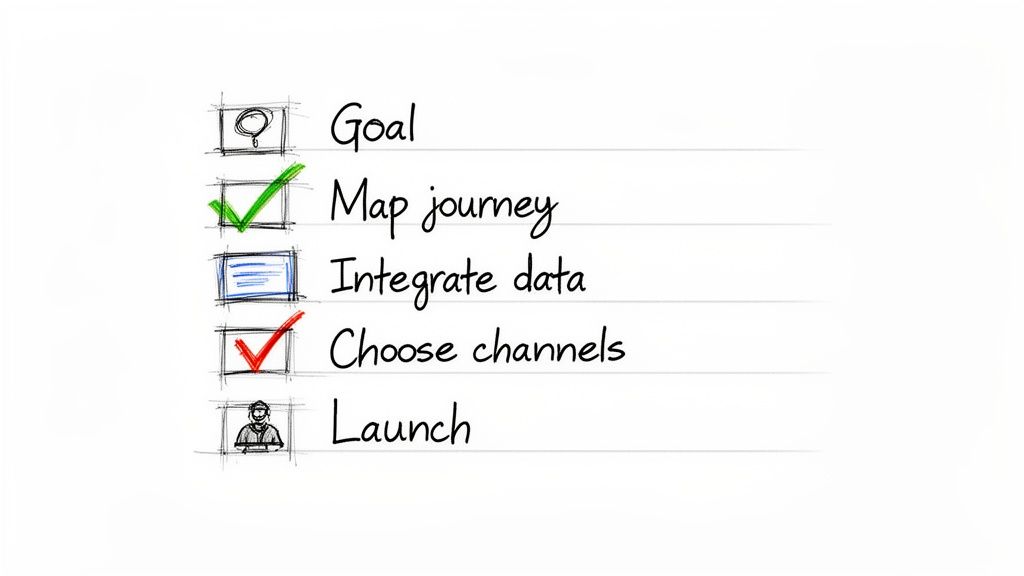
Moving from theory to practice can feel like a huge leap, but rolling out your first multi-channel workflow doesn't have to be a massive project. The trick is to start small, laser-focus on a single goal, and build from there. This checklist is your practical, step-by-step guide to launch, learn, and grow.
Think of this as your first experiment, not a company-wide overhaul. By following these steps, you'll build a foundational workflow that proves its value right away and gives you the insights needed to scale your efforts across the entire customer lifecycle. Let's dig in.
Step 1: Define Your Goal and Scope
Before you touch any software, you need to know exactly what you're trying to accomplish. A fuzzy goal like "improve engagement" just won't cut it. You need something specific, measurable, and directly tied to a business outcome.
For your first run, pick a high-impact but low-complexity piece of the customer journey. The welcome and onboarding sequence for new trial signups is almost always the perfect place to start.
Here's what a clear, actionable goal looks like:
Increase the percentage of new users who complete a key activation step (like "create first project") by 15% within their first seven days.
Reduce the number of new users who go inactive after 48 hours by 20%.
Drive an additional 10% of trial users to view the pricing page during their first week.
Step 2: Map the Customer Journey
With a sharp goal in hand, you can now sketch out the ideal path a user should take. This doesn't need to be a complex, sprawling diagram of every single possibility. Just focus on the critical touchpoints that get the user to your goal.
For a welcome sequence, the journey map could be as simple as this:
User signs up for a free trial.
They get an instant welcome email with a clear CTA to log in.
On their first login, an in-app tooltip points out the main feature they need for activation.
If they don't complete that key action in 24 hours, a follow-up email lands in their inbox with a helpful guide.
If they're still inactive after 3 days, a retargeting ad reminds them of the product's core value.
This simple map instantly clarifies the triggers, timing, and channels you'll use to guide the user toward that critical "aha!" moment.
Step 3: Connect Your Data Sources
Your automation is only as good as the data it runs on. For this first workflow, you'll need to make sure your marketing automation platform is talking to the tools that track what your users are actually doing.
The absolute must-have connection for any B2B SaaS company is between your product analytics and your automation tool. Without it, your messages are just guessing. Real-time behavioral data is what makes them truly effective.
Make sure you can track the key events from your journey map. That means getting your app to send data points like "User Signed Up," "User Logged In," and "User Completed [Key Action]." The most reliable ways to do this are with webhooks or a direct API integration.
Step 4: Build and Test Your Workflow
Alright, it's time to actually build this thing. Open up your automation platform and, using its visual builder, translate your journey map into a sequence of triggers, delays, and actions. For every message, double-check that the copy is helpful, concise, and pushes the user toward your one specific goal.
Testing is non-negotiable. Create a segment of internal users or a few test accounts and send them through the entire sequence from start to finish.
Did the emails show up at the right time?
Did the in-app message trigger correctly?
Is the messaging consistent and clear across every channel?
Iron out all the bugs and fix any weird logic now, long before a real customer sees it. This step is what saves you from delivering a broken customer experience and ensures your data is clean and reliable from day one.
Answering Your Automation Questions
As you start digging into multi-channel marketing automation, the practical questions always surface. It's one thing to talk about strategy, but another to actually get it running. We get it.
Let's clear the air on the most common questions we hear from B2B SaaS leaders. This isn't about theory; it's about giving you the confidence to move forward.
🚀 Transform Your Email Marketing with SMASHSEND
Ready to turn your customer data into automated revenue growth? SMASHSEND provides the tools B2B SaaS teams need to build and scale powerful multi-channel workflows. See how our platform can help you activate, retain, and expand your customer base.
Frequently Asked Questions
Have a question not in here? Contact us
- What Is the Difference Between Multichannel and Omnichannel Automation?
Multichannel marketing uses more than one channel to talk to customers, but those channels usually don't talk to each other. Omnichannel automation creates one single, fluid conversation with your customer where all channels are integrated and work in harmony.
- How Much Technical Expertise Is Needed to Set Up Automation Workflows?
Modern automation platforms are built for marketers, not developers. Today's best tools feature visual workflow builders with simple drag-and-drop interfaces. While initial setup might need some developer help, day-to-day campaign management is designed for marketing teams.
- Can Multi-Channel Automation Feel Robotic or Impersonal?
When done right, multi-channel marketing automation allows you to be more human and personal at scale. The secret is using rich behavioral and firmographic data to make every message feel relevant and helpful, triggered by user-specific actions.
- How Do I Measure the ROI of My Multi-Channel Automation Efforts?
Focus on tangible business outcomes rather than channel-specific vanity metrics. Run controlled experiments comparing automated workflows against control groups, measuring impact on trial-to-paid conversion rates, customer lifetime value, and churn rates.