
How to Check SPF DKIM DMARC Records to Boost Email Security
To get a clear picture of your SPF, DKIM, and DMARC setup, you'll need to look at your domain's DNS settings. The good news is you don't have to be a command-line wizard to do it. Free online validation tools can give you an instant report on your email authentication, flagging errors and confirming everything is working without needing deep technical know-how.
Why Email Authentication Is Critical for Your Business
Imagine your most important renewal campaign landing in spam because of a simple SPF misconfiguration. That's a direct hit to your bottom line. For any business that relies on email to grow, every single message you send is a revenue opportunity.
Mastering email authentication isn't just a technical box to tick; it's a real competitive advantage.
This guide cuts through the jargon. We'll show you exactly why checking your SPF, DKIM, and DMARC setup is a core driver of revenue and trust. My goal here is to connect each protocol to a tangible business benefit, so you stop seeing this as a chore and start mastering it for growth.
The Business Impact of Email Security
Email authentication is your first line of defense in protecting your brand and maximizing your marketing ROI. Without it, you're leaving the door wide open for cybercriminals to impersonate your domain, which quickly erodes customer trust and tanks your sender reputation.
A poor reputation leads to lower deliverability, and lower deliverability means lost revenue. It's that simple.
Here's a quick breakdown of what each protocol actually does for your business:
SPF (Sender Policy Framework) stops basic domain spoofing by creating an approved list of servers allowed to send email on your behalf.
DKIM (DomainKeys Identified Mail) works like a tamper-proof digital seal, ensuring your message content hasn't been messed with in transit.
DMARC (Domain-based Message Authentication, Reporting & Conformance) is the real game-changer. It gives you the intelligence to protect your brand by telling receiving servers what to do with unauthenticated mail.
The data paints a pretty stark picture. Out of the 10 million most popular domains, a shocking only 36.7% publish a valid SPF record. That leaves a massive 61.9% completely unprotected. For B2B SaaS teams, this directly eats into the ROI on every critical email sequence you send.
Getting a handle on how email authentication works is fundamental to your business's defense. This foundational knowledge is key to building a secure communication strategy, something we cover in our guide to B2B email marketing best practices.
Choosing Your Toolkit for Authentication Checks
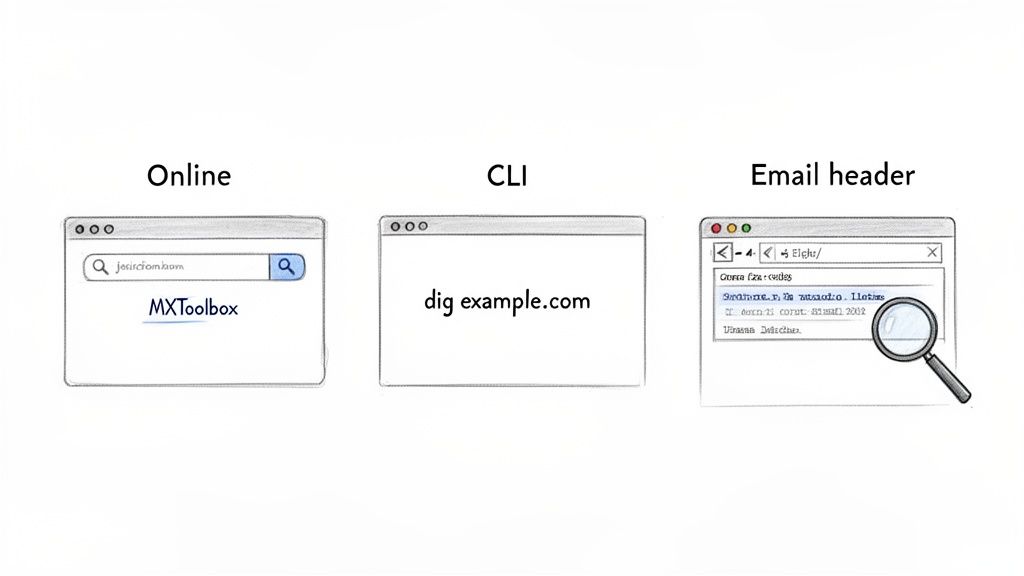
You don't need to be a developer to check SPF, DKIM, and DMARC records and get a handle on your email security. The best tool for the job really just depends on your comfort level with tech and how deep you need to go. We'll walk through three practical approaches that work for everyone, from marketers who just need a quick status check to IT pros who want the raw data.
Each method gives you a different view of your authentication setup. Online tools offer instant clarity, command-line interfaces give you raw speed and detail, and email headers show you the real-world results of your work. Let's break them down so you can pick the best fit.
Comparing Methods for Email Authentication Checks
This quick comparison will help you choose the right method for checking your SPF, DKIM, and DMARC records based on your needs.
| Method | Best For | Technical Skill | Key Benefit |
|---|---|---|---|
| Online Validators | Quick diagnostics, beginners, visual learners | Low | Easy-to-read reports with error flagging |
| Email Headers | Troubleshooting specific email delivery issues | Medium | Shows real-world results from a receiver's view |
| Command-Line (CLI) | IT professionals, automation, fast lookups | High | Raw, unfiltered data directly from DNS |
Ultimately, having a basic familiarity with all three will make you a much more effective troubleshooter.
User-Friendly Online Validators
For most people, the simplest way to check your records is to just use an online validator. Tools like MXToolbox, DMARCian, or EasyDMARC are built for this. You pop in your domain name, hit a button, and they run a whole series of checks, serving up the results in a clean, understandable format.
What makes these web-based tools so great is that they don't just spit out the raw record—they actually interpret it for you. They'll often flag common mistakes, like when you've exceeded the 10 DNS lookup limit in your SPF record, or point out that your DMARC policy is still in monitoring mode (p=none). That kind of instant feedback is a lifesaver for quick diagnostics.
Analyzing Email Headers Directly
Another incredibly powerful method is to look directly at an email's headers. This approach tells you exactly how a receiving server, like Gmail or Outlook, saw your SPF, DKIM, and DMARC settings for a specific message. It's the ultimate source of truth.
To get to this, you'll need to find the "Show original" or "View message source" option in your email client. It looks like a wall of technical jargon, but you're hunting for a section called Authentication-Results.
This part gives you a clear verdict:
spf=passdkim=passdmarc=pass
Seeing a "pass" on all three is what you're aiming for. If you see a "fail" or "softfail," it tells you precisely which protocol is broken for that specific sending service. This is especially handy for figuring out why emails from your new marketing platform are suddenly going to spam.
If everything seems right but you're still hitting a wall, our guide on what to do when your domain is not verified has some deeper troubleshooting steps.
Pro Tip: Reading the headers is the absolute best way to confirm that a third-party service (like your CRM or helpdesk) is properly configured. It moves you past theory and shows you what's actually happening out in the wild.
Interpreting Your SPF Record Check Results
Getting a simple "pass" or "fail" on an SPF check is only the first step. The real work is digging into what those results actually mean for your email deliverability and figuring out how to fix the gaps you find. Think of your SPF record as more than just a line of code—it's a precise set of instructions you're giving to every mail server in the world.
When you check your SPF, DKIM, and DMARC configuration, the SPF record is your foundational layer of defense. It's a simple TXT record living in your DNS that acts as a bouncer, listing all the servers officially allowed to send email for your domain. If a message shows up from a server not on that list, it fails the check. Simple as that.
Decoding SPF Record Components
Let's pull apart a typical SPF record. It might look like technical jargon at first glance, but each piece has a very specific job.
v=spf1: This is just the version tag. It's the first thing a server looks for, essentially saying, "Yep, this is an SPF record." Every single SPF record has to start with this.include:: This is a powerful mechanism that basically says, "Go check the SPF record for this other domain and trust whatever it says." It's how you authorize third-party services you rely on, like Google Workspace or SMASHSEND.a: This tag gives permission to the server listed in your domain's A record.mx: This authorizes any servers listed in your domain's MX records to send mail.
The last and arguably most critical piece is the "all" mechanism. This little tag tells receiving servers what to do with any email that comes from a source not explicitly listed in your record. Getting this right is crucial.
HardFail vs SoftFail: What to Choose
Your choice between ~all and -all directly impacts how protected you are from spoofing.
~all(SoftFail): This tells servers that if an email fails the check, it's suspicious and should probably be treated with caution (like being sent to spam), but it doesn't slam the door shut. It's the perfect place to start when you're not 100% confident your record is perfect.-all(HardFail): This is a direct command: reject any email that fails the SPF check, no questions asked. It provides the strongest security, but it also means you have to be absolutely certain every single legitimate sending service is accounted for in your record.
A classic mistake I see all the time is jumping to -all (HardFail) way too early. My advice is always to start with ~all (SoftFail). Let it run for a while and monitor your DMARC reports. This way, you can be sure you aren't accidentally blocking legitimate emails, like password resets from your own app.
Common SPF Errors and How to Fix Them
Even a record that technically "passes" can have hidden issues. The most common—and costly—error I run into is exceeding the 10 DNS lookup limit. Each include:, a, mx, and ptr mechanism in your record counts as a lookup. Once you go over 10, your SPF record becomes invalid and authentication fails completely.
Let's say you use Google Workspace for your team's email, SMASHSEND for newsletters, and another platform for transactional messages. Your SPF record might look like this:
v=spf1 include:_spf.google.com include:send.smashsend.com include:thirdpartyservice.com -all
This looks clean, but each of those "include" statements triggers its own DNS lookup. The real problem is when those services have their own nested lookups inside their SPF records. You can hit that 10-lookup limit shockingly fast. Always use an online SPF checker that counts the lookups for you. If you find you're over the limit, you'll need to "flatten" your record or audit and remove services you no longer use.
Another pitfall is simply forgetting to authorize a new sender. Your finance team might sign up for a new invoicing platform, but if you don't add its include: tag to your SPF record, every single invoice they send will fail authentication and probably end up in spam folders. This is why regular audits of your sending services are non-negotiable.
Cracking Open the DKIM Signature in Your Emails
If SPF is the guest list for your approved senders, think of DKIM as the tamper-proof wax seal on the envelope. This cryptographic signature proves two absolutely critical things: that the email is genuinely from your domain and that nobody messed with it along the way.
For any business sending sensitive information—invoices, password resets, contracts—a valid DKIM signature isn't just a "nice-to-have." It's fundamental to maintaining trust and the integrity of your communications.
To check SPF, DKIM, and DMARC for a specific email, you have to get your hands a little dirty and dig into its headers. Buried in all that technical jargon, you're hunting for a specific line: the DKIM-Signature header. This signature is packed with tags that tell the story of the email's journey.
Finding the Most Important DKIM Tags
When you find that signature, you're really looking for two key pieces of the puzzle:
The
d=tag: This tells you the domain that actually signed the message. This is the domain you'll need to check in your DNS for the matching public key.The
s=tag: This is the selector. Think of it as a specific name for the key used to sign that email. One domain can use multiple DKIM keys for different sending services (like one for your CRM, another for your help desk), and the selector tells receiving servers exactly which one to look up.
With these two tags, a receiving mail server knows exactly where to look. It pieces together a DNS query for a TXT record at a specific address, something like selector._domainkey.yourdomain.com. If the server finds the public key there and it successfully validates the signature in the header, DKIM passes.
This process is the bedrock of deliverability for automated sending, which is why a solid transactional email API relies on it so heavily.
Why DKIM Fails Even With a Perfect Record
Here's a scenario that drives people crazy: your DKIM record is set up perfectly in your DNS, but your emails are still failing the check. What gives?
This almost always happens when an email forwarder or a mailing list server modifies the message content, even in a tiny way. Adding a simple footer like "This message was forwarded" is enough to break the cryptographic signature, causing the DKIM check to fail spectacularly.
It's a perfect example of why proper setup is so important from the start. Recent surveys show that while 66% of senders believe they're using both SPF and DKIM, a shocking 25.7% don't even know how their own organization handles these authentication basics. In the B2B world, that lack of awareness is a killer, as a broken DKIM signature can tank deliverability even for an SPF-aligned email.
How to Read and Act on Your DMARC Reports
Think of DMARC as your email security command center. It gives you the raw intelligence you need to see who's really sending email from your domain. DMARC takes the technical details of SPF and DKIM and turns them into a clear, actionable roadmap for protecting your brand.
The first step is understanding your own DMARC record and its policy. The policy tag—p=none, p=quarantine, or p=reject—is a direct instruction to receiving mail servers, telling them exactly what to do with messages that fail authentication. But the real power comes from the DMARC aggregate (RUA) reports that start landing in your inbox.
Making Sense of DMARC Aggregate Reports
These reports show up as XML files. If you've ever tried to open one, you know they're a nightmare for humans to read. Trying to sift through raw XML is a surefire way to get frustrated and miss critical insights.
This is exactly why DMARC monitoring tools are not just a nice-to-have; they're essential.
These services do the heavy lifting, parsing all that raw data and turning it into visual, easy-to-understand dashboards. Suddenly, you get a complete picture of your email ecosystem. You can quickly identify every single service sending mail on your behalf, spot unauthorized senders trying to spoof your domain, and pinpoint which sources are consistently failing their authentication checks.
This visualization shows the high-level process of how DKIM works to secure your emails before DMARC even comes into play.
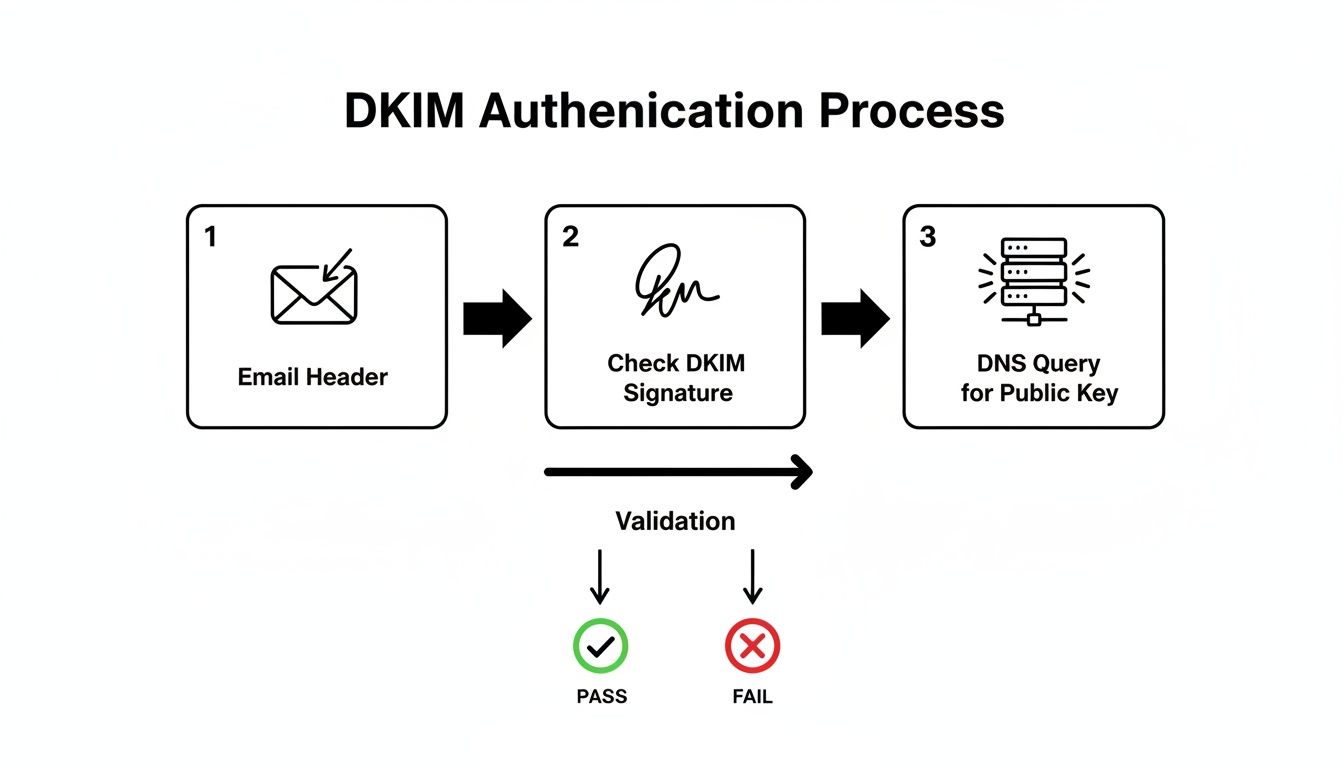
The flow from the email header to the DNS check really highlights why a valid signature is a non-negotiable prerequisite for passing DMARC.
From Monitoring to Enforcement
Getting to full DMARC enforcement is a methodical journey, not a sprint. If you rush it, you risk blocking legitimate emails, which can cause serious disruptions to your business. The goal is to move from a state of passive monitoring to active protection with total confidence.
Here's the proven roadmap we use:
Start with
p=none(Monitoring): This policy simply gathers data without affecting email delivery at all. You'll want to let this run for at least a few weeks to collect comprehensive reports from all your sending sources. Don't rush this part.Analyze and Remediate: Dive into your monitoring tool to identify all legitimate senders. You'll need to methodically work through any services that are failing SPF or DKIM alignment, correcting their DNS records until they pass consistently.
Move to
p=quarantine: Once you're confident that all your legitimate mail is authenticating correctly, it's time to shift your policy top=quarantine. This tells servers to send unauthenticated mail to the spam folder. Keep a close eye on the impact.Enforce with
p=reject: This is the final step. Moving top=rejectinstructs servers to block fraudulent emails entirely, giving you the strongest possible protection against spoofing.
Adopting DMARC is no longer a niche practice; it's becoming the standard for secure business communication. A recent EasyDMARC report revealed that among top domains, adoption surged from 27.2% to 47.7%—a 75% increase. However, many remain stuck in monitoring mode, leaving their domains vulnerable.
For B2B SaaS companies using a platform like SMASHSEND, this is especially critical. While high-volume senders have reached 70% DMARC adoption, only 37% are actually enforcing it. This means a staggering 63% still have zero defense against spoofing, which directly impacts the trust and deliverability of their automated lifecycle campaigns. This clear, data-driven approach is the only way to reliably check SPF, DKIM, and DMARC effectiveness and secure your email channel for good.
Common Email Authentication Questions Answered
Even after you've got everything set up, a few practical questions always seem to pop up when you're managing email authentication. These protocols have some tricky nuances that can be confusing, especially when you're in the middle of troubleshooting a problem. Let's tackle some of the most frequent challenges you'll likely run into.
Getting these little details right is a huge deal. A simple misunderstanding can be the difference between a secure, trusted email channel and one that's wide open to spoofing and phishing attacks.
How Long Do DNS Changes Take to Update?
I get this question all the time. When you update your SPF, DKIM, or DMARC records, the change isn't instant. The whole process is called DNS propagation, and it can take anywhere from a few minutes to a full 48 hours to ripple across the entire internet.
What controls this timing? It's all down to the TTL (Time To Live) setting on your DNS record. A shorter TTL tells servers around the world to check for updates more often. A good rule of thumb is to periodically check your records with an online validator after you make a change. This way, you can see for yourself when the update has finally gone live everywhere.
Why Are My Emails Failing SPF Even With a Valid Record?
This is a frustratingly common scenario, but it almost always comes down to one of three things.
The most frequent culprit is breaking the 10 DNS lookup limit. If your SPF record gets bloated with too many include: mechanisms to authorize all your third-party senders, it will simply fail. Always run it through a validator tool that specifically counts your lookups.
Another classic issue is when the sending IP address just isn't covered by your record. This often happens when someone on the team starts using a new email service and forgets to update the SPF record.
Finally, email forwarding is a notorious SPF-breaker. When an email is forwarded, the forwarding server's IP won't match your record, which is exactly why having DKIM and DMARC aligned is so critical for a truly comprehensive setup.
Understanding SoftFail vs. HardFail in SPF
The choice between ~all (SoftFail) and -all (HardFail) in your SPF record is a critical policy decision that tells receiving servers how to handle failures.
~all(SoftFail): This tag is like a friendly suggestion. It tells receiving servers that unauthenticated mail is suspicious and should probably be inspected more closely, but not necessarily rejected on the spot. It's the perfect place to start.-all(HardFail): This is a direct command. It tells servers to reject any email that fails the SPF check, no questions asked. It offers the strongest possible protection against direct domain spoofing.
You should only switch to a HardFail (-all) once you are 100% certain your SPF record includes every single legitimate service that sends email on your behalf. The safest strategy is to start with a SoftFail, monitor your DMARC reports, and only move to HardFail when you're sure no valid mail is being blocked.
Can I Have More Than One SPF or DMARC Record?
Nope. This is a hard and fast rule you can't bend. A domain must have only one SPF record. If you create multiple TXT records that start with v=spf1, you'll cause a permanent error that completely invalidates your entire SPF setup. If you need to authorize multiple senders, you have to merge them all into a single, carefully crafted record.
The same goes for DMARC—you can only have one DMARC record, and it has to live at the _dmarc.yourdomain.com subdomain.
DKIM is the exception. You can, and often must, have multiple DKIM records. Each sending service you use will typically require its own unique record with a distinct selector.
At SMASHSEND, we take deliverability seriously. That's why we provide automatic SPF, DKIM, and DMARC setup, letting you focus on driving revenue with your email campaigns instead of wrestling with DNS records. Learn how SMASHSEND keeps your emails out of the spam folder.
🎯 Key Takeaways
Free online validation tools can give you an instant report on your email authentication, flagging errors and confirming everything is working without deep technical knowledge
Email headers show the real-world Authentication-Results for spf=pass, dkim=pass, and dmarc=pass from receiving servers like Gmail and Outlook
SPF records have a critical 10 DNS lookup limit—exceeding it makes your entire SPF record invalid and causes authentication to fail completely
DKIM signatures can fail even with perfect DNS records when email forwarders or mailing lists modify message content, breaking the cryptographic seal
DMARC enforcement should be a gradual journey: start with p=none (monitoring), analyze reports, move to p=quarantine, then finally p=reject for maximum protection
Only 36.7% of domains publish valid SPF records, leaving 61.9% completely unprotected—proper email authentication is a real competitive advantage
Frequently Asked Questions
Have a question not in here? Contact us
- How Long Do DNS Changes Take to Update?
When you update your SPF, DKIM, or DMARC records, the change isn't instant. The whole process is called DNS propagation, and it can take anywhere from a few minutes to a full 48 hours to ripple across the entire internet. What controls this timing? It's all down to the TTL (Time To Live) setting on your DNS record.
- Why Are My Emails Failing SPF Even With a Valid Record?
This is a frustratingly common scenario, but it almost always comes down to one of three things. The most frequent culprit is breaking the 10 DNS lookup limit. If your SPF record gets bloated with too many include: mechanisms to authorize all your third-party senders, it will simply fail. Another classic issue is when the sending IP address just isn't covered by your record.
- Understanding SoftFail vs. HardFail in SPF
The choice between ~all (SoftFail) and -all (HardFail) in your SPF record is a critical policy decision. SoftFail tells servers that if an email fails the check, it's suspicious and should probably be treated with caution, while HardFail is a direct command to reject any email that fails the SPF check, no questions asked.
- Can I Have More Than One SPF or DMARC Record?
No. This is a hard and fast rule you can't bend. A domain must have only one SPF record. If you create multiple TXT records that start with v=spf1, you'll cause a permanent error that completely invalidates your entire SPF setup. The same goes for DMARC—you can only have one DMARC record. DKIM is the exception - you can have multiple DKIM records with different selectors.
- What are the most important email authentication protocols?
The three critical email authentication protocols are SPF (Sender Policy Framework), DKIM (DomainKeys Identified Mail), and DMARC (Domain-based Message Authentication, Reporting & Conformance). SPF prevents basic domain spoofing, DKIM ensures message integrity with cryptographic signatures, and DMARC provides policy enforcement and reporting.
- How do I check if my email authentication is working properly?
You can check your email authentication in three ways: online validators like MXToolbox for quick diagnostics, analyzing email headers directly to see real-world results from receiving servers, or using command-line tools for raw DNS data. The most reliable method is checking email headers for Authentication-Results showing spf=pass, dkim=pass, and dmarc=pass.