
A Practical Guide to Workflow Marketing Automation
Imagine having a smart assistant working 24/7, personally guiding every single customer through their journey with your product. That's the real power behind workflow marketing automation.
This isn't about sending generic email blasts to everyone on your list. It's about triggering personalized, timely messages based on what people actually do—or don't do. The result? Intelligent conversations that feel personal and drive real business growth.
What Is Workflow Marketing Automation
Think of it like the difference between a paper map and a modern GPS.
A traditional email campaign is like that old paper map. It shows everyone the exact same route, regardless of traffic, wrong turns, or personal preference.
Workflow marketing automation, on the other hand, is your customer's personal GPS. It recalculates the best path in real-time. Did they get stuck? It offers a helpful detour. Are they moving fast? It suggests a shortcut. It's a dynamic system designed to get each user to their destination successfully.
This is the big shift: moving away from one-off campaigns and toward automated, lifecycle-focused communication.
Instead of hitting "send" manually, you design a series of "if-this, then-that" rules that react to user behavior automatically. For example:
If a user signs up for a trial, then start a welcome email sequence.
If they haven't used a key feature after three days, then send a short guide showing them how.
If a paying customer keeps visiting the upgrade page but doesn't pull the trigger, then send them a case study about the premium features.
The goal is to make every message feel relevant and perfectly timed, making customers feel understood, not just marketed to.
From Niche Tactic to Global Standard
What was once a niche tactic for early adopters is now the standard operating procedure for high-growth companies. The marketing automation industry is set to blow past $8.23 billion in 2024, and for good reason.
A staggering 72% of top-performing companies use marketing automation. This isn't a coincidence; it shows a clear link between intelligent workflows and hitting your numbers. And email is still king, with most marketers using it as the primary channel for these automated sequences. You can dig into more of this data in HubSpot's latest marketing research.
The whole point is to build a system that runs on its own, nurturing users at every single stage of their journey.
A workflow doesn't just send emails; it creates a connected, intelligent conversation. It's the engine that powers scalable growth by ensuring no user falls through the cracks, from their first click to their annual renewal.
This system moves beyond basic email marketing and into the realm of strategic, behavior-driven communication. It's all about sending the right message to the right person at precisely the right time to guide them toward their next valuable action.
Traditional Email Marketing vs Workflow Automation
To really understand the jump from one-off emails to automated workflows, let's look at a side-by-side comparison. It highlights the strategic shift in thinking, from short-term campaigns to long-term customer relationships.
| Attribute | Traditional Email Marketing | Workflow Marketing Automation |
|---|---|---|
| Focus | One-off campaigns (e.g., newsletters) | Entire customer lifecycle |
| Triggers | Manual send or fixed schedule | User behavior (actions or inactions) |
| Personalization | Basic (e.g., First Name) | Deep and dynamic (based on actions) |
| Timing | Same for everyone | Unique to each user's journey |
| Scale | Labor-intensive | Runs 24/7 automatically |
| Goal | Drive immediate action (e.g., clicks) | Guide users to the next valuable step |
As you can see, workflow automation isn't just a more efficient way to send emails—it's a fundamentally different, more customer-centric approach to marketing. It's about building a responsive system, not just a louder megaphone.
Five Essential SaaS Marketing Workflows
Theory is great, but a practical playbook is what actually moves the needle. When it comes to workflow marketing automation, success isn't about building dozens of hyper-complex sequences. It's about absolutely mastering a few core workflows that perfectly map to the B2B SaaS customer lifecycle.
These five workflows are the foundation of any solid, automated growth engine.
At its heart, a workflow is just an automated series of "if-then" decisions. A trigger kicks things off, a condition checks if certain criteria are met, and an action—like sending a message—happens as a result.
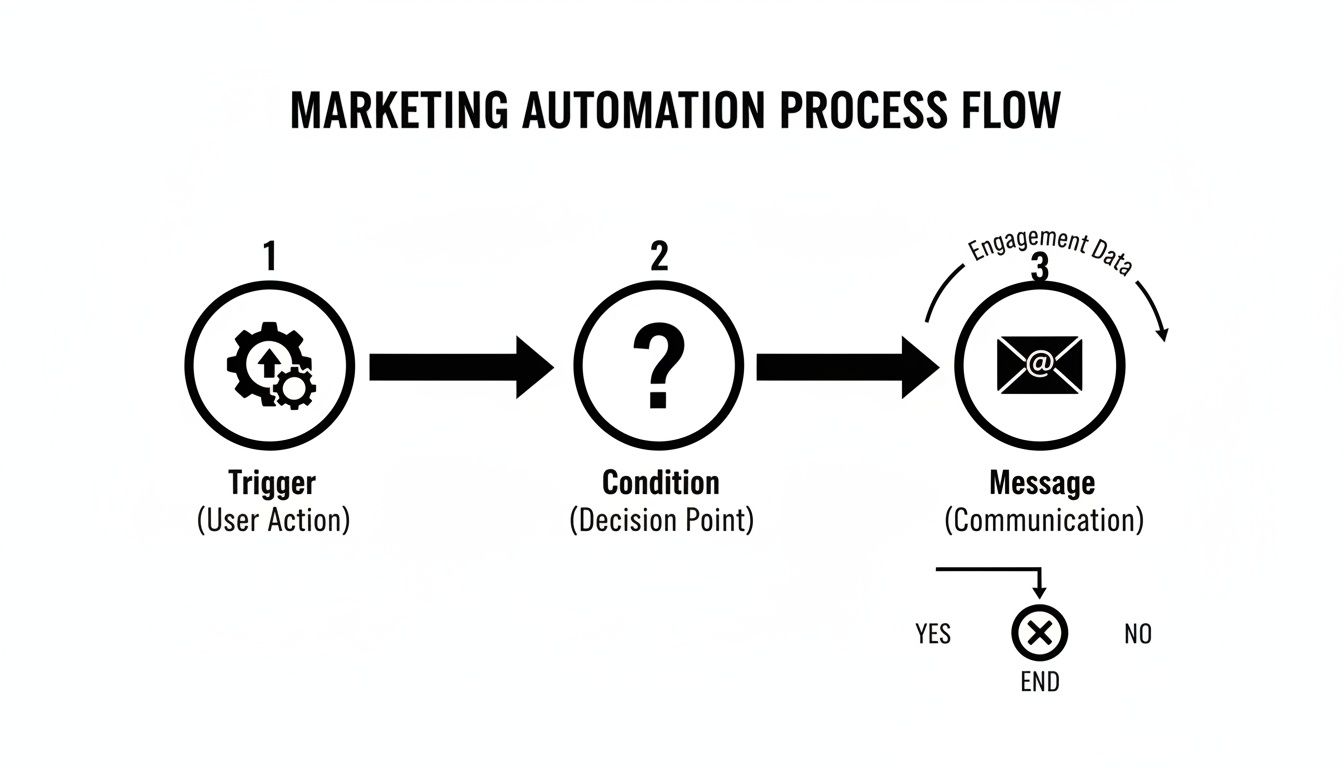
This simple Trigger > Condition > Message model is the building block for every powerful sequence we're about to cover. It's proof that sophisticated strategies are just simple, logical steps stacked together.
1. User Activation Workflows
The first few moments after someone signs up are make-or-break. A user activation workflow is your secret weapon against the dreaded "sign up and ghost" phenomenon. Its entire purpose is to guide new users to experience your product's core value—their "aha!" moment—as fast as humanly possible.
Business Objective: Boost the percentage of new signups who perform a key action (like creating their first project or inviting a teammate). This has a massive downstream effect on long-term retention.
Common Triggers: A user signs up for a free trial or freemium plan.
Example Sequence: A focused series of emails, each highlighting one high-impact feature, maybe with a quick video tutorial and a crystal-clear call-to-action to try it out right now.
2. Customer Onboarding Workflows
Okay, they're activated. Now what? The journey has just begun. The onboarding workflow takes the baton from activation, aiming to turn that initial spark of interest into a burning fire of proficiency and confidence. This isn't about one action; it's about building habits and methodically revealing your product's full power over time.
This workflow is absolutely critical for turning initial curiosity into lasting engagement. It lays the groundwork for every dollar of expansion revenue you'll earn later.
An effective onboarding sequence does more than just explain features. It builds momentum by celebrating small wins and progressively revealing value, making your product an indispensable part of the user's daily operations.
For instance, if a user successfully created their first report (the activation event), the onboarding flow might then nudge them to explore collaboration tools. A few days later, it could introduce advanced filtering, and then finally, integration options. Each step builds on the last, deepening their investment in your platform.
3. Account Expansion Workflows
Let's be honest: not all users are created equal. Account expansion workflows are your system for automatically identifying your power users and product champions. Then, you nurture them toward an upgrade. This is where automation stops being a cost center and becomes a direct revenue driver.
These workflows constantly monitor usage patterns, looking for signals that a team is starting to outgrow their current plan.
Business Objective: Increase Average Revenue Per Account (ARPA) and generate more revenue from the customers you already have.
Common Triggers: A user repeatedly bumps into a premium feature paywall, an account hits 90% of its usage limit (e.g., contacts, projects), or someone on a small plan invites teammates from a much larger company.
Example Sequence: When a team hits their project limit, an automated email fires off to the account admin. It congratulates them on their progress and clearly lays out the benefits of upgrading, maybe even linking to a case study from a similar company that made the leap.
4. Billing Recovery Workflows
Involuntary churn is a silent killer of SaaS revenue. It's usually caused by something as simple as an expired credit card. A billing recovery workflow, often called a dunning sequence, automates the awkward-but-essential process of asking customers to update their payment info.
This is more than just a single "payment failed" alert. A well-designed workflow handles this delicate conversation with grace, preserving the customer relationship while clawing back revenue that would have simply vanished.
Business Objective: Slash involuntary churn and recover revenue from failed subscription payments.
Common Triggers: A recurring payment is declined.
Example Sequence:
- Instantly: An email is sent with a direct, one-click link to their billing page.
- 3 Days Later: A friendly reminder follows up, highlighting the key features they're about to lose.
- 7 Days Later: A final, more urgent notification lands before the account is suspended.
5. Win-Back Campaigns
Sometimes, customers leave for reasons other than a failed payment. A win-back campaign is your automated effort to re-engage and recover users who have actively canceled or let their trial expire without converting.
Segmentation is everything here. You wouldn't send the same message to everyone. A user who canceled citing price might get a special offer, while one who just went dormant might get an update on all the cool new features you've added since they left. To get your gears turning, you can find more actionable marketing automation workflow examples that show what's possible.
By putting these five core workflows in place, you're creating an automated safety net that spans the entire customer lifecycle. You're not just sending emails; you're building a system that activates users, deepens engagement, drives expansion, prevents churn, and works 24/7 to win back customers. This is the heart of strategic workflow marketing automation.
Building Your First Workflow: Step-by-Step
Alright, let's get our hands dirty and turn all that theory into practice. The absolute best way to really get the power of workflow marketing automation is to build one from the ground up, step-by-step.
We're going to build a classic: the trial user onboarding workflow. This is a must-have for any B2B SaaS company that's serious about product-led growth.
This whole process is about taking the guesswork out of the equation. Forget staring at a blank screen. We're laying out a clear, actionable roadmap that shows you exactly how to guide a new user from signup to that critical "aha!" moment.
Step 1: Define a Clear, Measurable Goal
Every workflow that actually works starts with a single, specific objective. A fuzzy goal like "increase engagement" is useless because you can't build around it or measure it. We need something tangible.
For this example, our goal is laser-focused: Get a new trial user to invite at least one teammate within the first five days.
Why this goal? For a SaaS product, getting a user to invite a coworker is a massive activation signal. It shows they see value, it gets them more invested in the tool, and it naturally expands your product's footprint inside their company. It's a huge win.
Step 2: Identify the Starting Trigger
The trigger is the starting gun. It's the one event that officially kicks off the entire automated sequence. This has to be a clean, unmistakable action that your system can track without fail.
Trigger Event: "User completes trial signup form" or "User is created".
This is the simplest, most reliable starting point. The second someone finishes signing up, they are automatically dropped into this onboarding journey. No manual work, no delays, no one falling through the cracks.
The magic of a well-designed workflow is its ability to create a personalized path for every single user, at scale. It ensures that the critical first steps of the user journey are never left to chance, providing guidance exactly when it's needed most.
By automating the entry, you guarantee every single trial user gets the same high-quality, structured experience, setting them up for success right from the start.
Step 3: Map the Workflow Logic
Now for the fun part. We're going to map out the entire sequence—the messages, the waiting periods, and the decision points. This is where your strategy comes to life. Think of it as building a smart decision tree for your user.
Most modern platforms have a visual, drag-and-drop interface that makes this surprisingly intuitive. If you want to see what this looks like, you can learn more about how a modern automation flow builder makes mapping out these kinds of sequences incredibly simple.
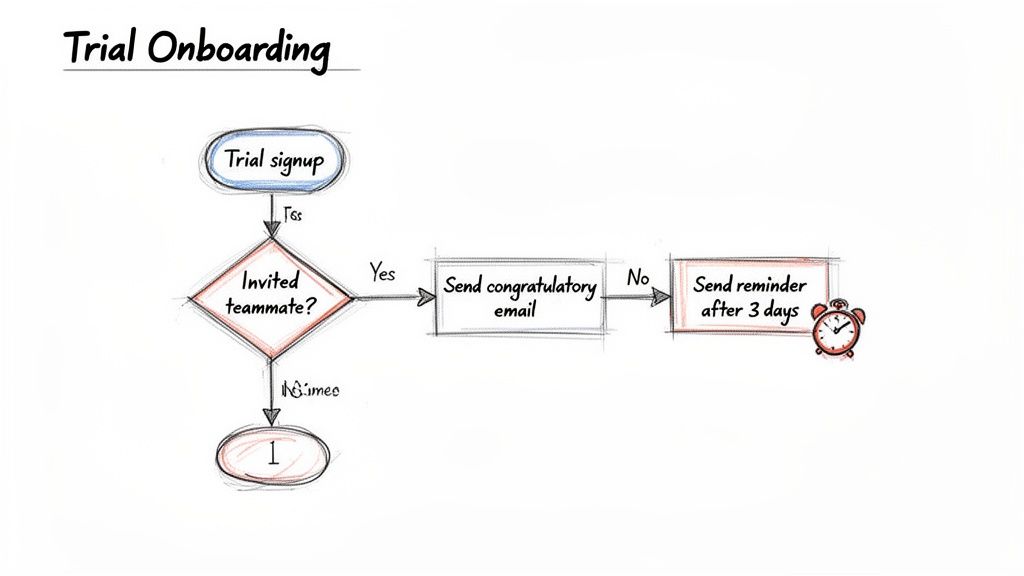
Here's the play-by-play for our teammate invitation workflow:
- Trigger: User signs up for a trial.
- Immediate Action: Send a welcome email.
- Subject: Welcome to [Your Product]! Here's how to get started.
- Content: A warm welcome, a direct link to their dashboard, and a super clear call-to-action to "Invite your team" to unlock collaborative features.
- Time Delay: Wait for 2 days.
- Conditional Split (If/Then Logic): Has the user invited a teammate yet?
- YES: Awesome! They've hit the goal. They exit this specific path and can be moved into a different workflow, maybe one focused on adopting advanced features.
- NO: They need a gentle nudge. Proceed to the next step.
- Action (If "No"): Send a reminder email focused on the value of collaboration.
- Subject: Get more done together in [Your Product]
- Content: This isn't a nagging email. You need to frame it around benefits. Use a quick bulleted list to show them what they gain by adding teammates—things like finishing projects faster or sharing key insights.
- Time Delay: Wait for another 2 days.
- Final Conditional Split: Check one last time: has a teammate been invited?
- YES: Success! You could send a quick, encouraging "great job" message.
- NO: Send a final, helpful email. This time, maybe offer a link to a help doc or a short video tutorial on the invitation process itself, just in case they're stuck.
By mapping out these steps with clear logic, you build a responsive system that adapts to what your users are actually doing (or not doing) in real time. It's a simple but incredibly powerful way to guide them toward success.
Choosing the Right Triggers and Segments
If a marketing workflow is an engine, then its triggers and segments are the brain. This is where the real intelligence lives. They're the decision-makers that turn a generic, one-size-fits-all sequence into a genuinely personal and timely conversation.
Without smart triggers and segmentation, your workflow marketing automation is just a glorified email blast scheduled in advance. It might be loud, but it's definitely not smart.
The magic happens when you move beyond simple, time-based instructions. Sure, sending an email three days after a signup is a decent start, but it assumes every user is the same. The workflows that actually move the needle are the ones that react to what your users actually do.
Time-Based vs. Behavior-Based Triggers
Getting a handle on these two trigger types is foundational. They each serve a very different purpose, and the most sophisticated workflows almost always use a mix of both.
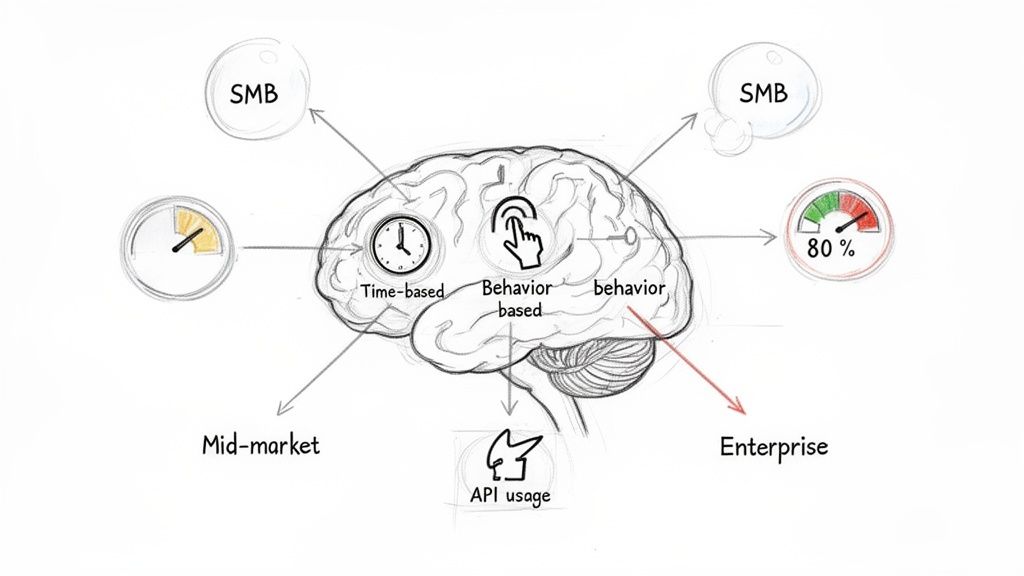
Time-Based Triggers: These are set off by the clock. Think "send this email 2 days after the last one." They're perfect for setting a consistent pace for something like an onboarding sequence. They keep the experience predictable but are totally blind to what an individual is doing inside your app.
Behavior-Based Triggers: These are fired by a user's actions—or lack thereof. This is where the game changes. Behavior-based triggers are infinitely more powerful because they respond to intent in real-time, making your automation feel personal and uncannily relevant.
The leap from time-based to behavior-based triggers is the difference between getting a calendar reminder and a friend texting you the moment you look lost. One is just scheduled. The other is responsive and perfectly timed.
Let me give you an example. A time-based trigger might send a discount offer seven days into a free trial. A behavior-based trigger sends that same offer the instant a user visits the billing page twice but fails to upgrade. Which one do you think is going to convert better? It's the second one, every single time, because it's directly tied to a user's demonstrated interest.
Dynamic Segmentation: The Secret Sauce
So, triggers kick off the workflow. But segmentation is what ensures the right person gets the right message within that workflow. Dynamic segmentation automatically groups users based on who they are or what they've done, letting you tailor the conversation with surgical precision.
This means you can build one master workflow that has different branches for different kinds of users. Instead of juggling dozens of separate, clunky sequences, you just use simple logic to send people down the path that makes the most sense for them.
Here are a few powerful ways B2B SaaS companies can segment users:
By Company Size: Your workflow can send small businesses content focused on getting started quickly and affordability. At the same time, enterprise leads get a different message entirely—one about security, compliance, and scaling with their team.
By Industry: A marketing agency using your tool could get a case study featuring another agency's success story. Meanwhile, a software company in the same workflow gets a technical whitepaper on API integrations.
By Usage Level: A power user who has already adopted 80% of your key features? They get automatically routed into an expansion workflow to discover advanced capabilities. A user with low engagement gets nudged into a re-engagement sequence with helpful tips.
This level of targeting makes your communication feel less like marketing and more like helpful guidance from an expert. It proves you understand who your users are and what they need to succeed.
To pull this off, you need to get that behavioral data into your automation platform. Many teams use third-party tools to sync complex data between their apps. If you're looking for ways to connect different data sources, checking out what a Zapier integration can do is a great starting point. It shows you just how easily you can pipe user actions into your workflows.
When you thoughtfully combine intelligent triggers with dynamic segmentation, you're not just automating tasks—you're building a system that anticipates user needs. This is the core principle that makes workflow marketing automation a true engine for scalable, personalized growth.
How to Measure Workflow Performance
So, you've built an automated workflow. That's a great start, but it's only half the battle. The real magic of workflow marketing automation happens when you know what's working, what's flopping, and exactly how to make it better. Great marketing is always measured, which means we need to look past feel-good metrics like open rates and zero in on the numbers that actually grow the business.
Every workflow you build has a specific job to do. You wouldn't judge a fish on its ability to climb a tree, right? In the same way, an onboarding workflow has a completely different mission than a billing recovery sequence. You've got to match your metrics to the specific outcome you're trying to create.
Linking Workflows to Business Outcomes
To prove the ROI of all your hard work, you need to draw a straight line from your workflow's performance to real business results. This means picking one primary KPI for each of the essential SaaS workflows we've already covered.
Here's a simple way to think about it:
User Activation Workflow: This is all about speed and that "aha!" moment. Your main KPI here should be Time to Value—how fast does a new user perform that one critical action that signals they're hooked? As a backup, keep an eye on the overall activation rate (the percentage of users who get it done).
Customer Onboarding Workflow: The goal here is to get users digging into your product. Track the Feature Adoption Rate, which tells you how many key features a new customer actually uses in their first 30 days. This number is a fantastic predictor of who will stick around for the long haul.
Account Expansion Workflow: This one is pure revenue. The most important number is your Upgrade Conversion Rate—the percentage of users in the workflow who jump to a higher-priced plan. You can also track the total revenue generated from expansion to put a clear dollar figure on its success.
Billing Recovery Workflow: Its job is simple: save customers from accidental churn. Your main KPI is Churn Rate Reduction, specifically the drop in involuntary churn. It's also powerful to track Recovered Revenue to show exactly how much cash the workflow clawed back.
Win-Back Campaign: You're bringing customers back from the dead. The number one metric is the Reactivation Rate, which is the percentage of churned users who come back to a paid plan.
Measuring the right KPIs turns your automation from just another marketing task into a predictable growth engine. You can finally say, "Our onboarding workflow increases feature adoption by 25%," instead of just, "Our emails get a lot of clicks."
Now that you know what to track for each workflow, let's pull it all together.
Here is a quick-reference table that connects each essential SaaS workflow to the metrics that matter most.
Key Metrics for SaaS Automation Workflows
| Workflow Type | Primary KPI | Secondary Metrics |
|---|---|---|
| User Activation | Time to Value | Activation Rate, First Week Engagement |
| Customer Onboarding | Feature Adoption Rate | Onboarding Completion Rate, Support Tickets Created |
| Account Expansion | Upgrade Conversion Rate | MRR from Expansion, Engagement with Upsell Content |
| Billing Recovery | Churn Rate Reduction | Recovered Revenue, Dunning Email Open/Click Rate |
| Win-Back Campaign | Reactivation Rate | Post-Reactivation Engagement, Customer Lifetime Value |
Think of this table as your cheat sheet. When you're building or reviewing a workflow, pull this up to make sure you're focused on a metric that directly impacts the health of your business.
Optimizing Performance with A/B Testing
Once you've got your baseline metrics, it's time to start tinkering. Continuous improvement is the name of the game, and the best way to play is with methodical A/B testing right inside your workflows. It sounds complex, but it's really about making small, smart changes to see what moves the needle.
You can test just about anything to get a lift.
Subject Lines: Try a clear, benefit-focused subject line against one that creates a little urgency.
Email Copy: Pit a short, punchy message against a more detailed, educational one.
Send Times: Does an email sent at 9 AM on a Tuesday outperform one sent at 3 PM on a Thursday? Test it.
Time Delays: Is it better to wait two days before a follow-up, or four?
By testing just one thing at a time and watching its effect on your primary KPI, you can systematically make every part of your workflow marketing automation stronger. It's this constant cycle of testing and learning that turns a good automated engine into a great one—one that reliably contributes to your bottom line.
How a Unified Platform Supercharges Your Automation
Knowing the right workflows is one half of the puzzle. Having the right engine to run them is the other. This is where a dedicated platform for workflow marketing automation stops being a "nice-to-have" and becomes a revenue-generating machine.
Instead of trying to duct-tape a handful of disconnected tools together, a unified system brings everything you need under one roof.
Think of it like building a race car. You could source a chassis from one place, an engine from another, and brakes from a third. It might work, but it will never perform like a vehicle engineered from the ground up for one purpose: to win. A unified platform like SMASHSEND is that purpose-built race car, designed specifically to help B2B SaaS companies grow.
From Strategy to Execution
A powerful platform is the bridge between a brilliant idea on a whiteboard and a real-world workflow that drives results. For instance, crafting high-converting email copy for every stage of your customer lifecycle used to be a multi-day project. Now, an integrated AI email editor can generate effective, on-brand messages in minutes.
This frees up your team to focus on high-level strategy instead of getting bogged down in the weeds of execution. The same goes for targeting. You can move beyond basic segmentation and start using rich behavioral data to trigger messages with surgical precision.
A truly unified platform doesn't just automate tasks; it empowers your entire lifecycle marketing strategy. It becomes the central nervous system that ensures the right message reaches the right user at the exact moment of impact, adding 10-30% more ARR without increasing headcount.
Built for SaaS Growth
The best platforms are built with the unique headaches of B2B SaaS in mind, from making sure emails actually get delivered to keeping customer data locked down.
Inbox Placement: You need more than just a "send" button. Built-in tools that automatically manage your SPF, DKIM, and DMARC records are non-negotiable for ensuring your critical onboarding and billing emails actually land in the inbox.
Seamless Integrations: Your marketing platform has to play nice with the rest of your tech stack. To really get the most out of your data, look into the benefits of integrating with marketing automation tools so that information flows effortlessly between systems.
Enterprise-Grade Security: As you grow, handling customer data becomes a serious responsibility. Rock-solid security protocols like GDPR and SOC 2 compliance are essential for maintaining trust and protecting your business.
By bringing all these elements together, a platform like SMASHSEND gives you the secure, reliable foundation you need to run sophisticated campaigns that just work. To see how this unified approach extends beyond email, check out our guide on multi-channel marketing automation.
Common Workflow Automation Questions
As powerful as workflow marketing automation is, it's only natural to have a few questions before diving in. Many B2B SaaS teams I talk to worry about the same things: Do we have the technical chops? What kind of results can we realistically expect?
Let's clear the air on some of the most common uncertainties.
One of the biggest hurdles seems to be the perceived complexity. People wonder if this stuff is only for massive companies with a platoon of engineers on standby. The answer is a firm no. Today's best platforms are built around visual, drag-and-drop editors, meaning marketers can build incredibly sophisticated sequences without ever touching a line of code.
The goal isn't to boil the ocean on day one. It's about launching your first workflow, gathering data, and making incremental improvements. This iterative approach is how you build a powerful, revenue-driving automation engine over time.
Finally, teams often ask if they have enough data to get started. You don't need a massive data warehouse. You can begin with simple triggers like "user signed up" or "subscription payment failed." As you get more comfortable, you can start layering in more behavioral data to make your workflows even smarter. The best systems are designed to grow with you.
🚀 Transform Your Marketing with SMASHSEND
Ready to build intelligent workflows that drive revenue 24/7? SMASHSEND provides the visual builder, behavioral triggers, and expert support B2B SaaS teams need to activate, retain, and expand their customer base. Start your free trial today.
Frequently Asked Questions
Have a question not in here? Contact us
- How Much Time Does It Take To See Results?
You can get a simple but powerful sequence—like a welcome series or a billing recovery flow—live in a single afternoon. You can often see tangible results, like a drop in involuntary churn or a jump in trial user activation, within the first 30 days.
- Do I Need a Lot of Technical Knowledge to Get Started?
Today's best platforms are built around visual, drag-and-drop editors, meaning marketers can build incredibly sophisticated sequences without ever touching a line of code. You can begin with simple triggers and expand as you get more comfortable.
- What's the Difference Between Workflow Automation and Email Marketing?
Traditional email marketing sends the same message to everyone on a schedule. Workflow automation sends personalized, behavior-based messages triggered by what users actually do. It's the difference between broadcasting and having intelligent conversations.
- How Do I Choose the Right Triggers for My Workflows?
Start with behavior-based triggers that respond to user actions in real-time. These are infinitely more powerful than time-based triggers because they're directly tied to demonstrated interest and intent.