
Transactional Email vs Marketing Email: A Clear Guide for B2B SaaS
Let's get one thing straight from the start: transactional emails are automated one-to-one messages sent because a user did something. Think password resets or purchase confirmations. On the flip side, marketing emails are one-to-many blasts sent to a hand-picked list to show off a product or nurture a lead.
The goal isn't to choose one over the other. The real magic happens when you master both, creating a seamless experience for your customers from their first click to their tenth renewal.
Transactional vs. Marketing Emails: The Core Differences
For any B2B SaaS company, getting this right is non-negotiable. It directly impacts user activation, keeps churn in check, and opens doors for account expansion. Transactional messages are the functional workhorses of your platform, delivering critical information your users need to get things done. They are the backbone of a great customer experience, building trust with every timely, relevant message.
Marketing emails, however, are all about driving growth. Their job is to persuade, engage, and convert subscribers into paying customers—or turn existing customers into power users. While they go out to a much broader audience, their success hinges on smart segmentation and content that actually solves a problem or sparks interest.
Comparing Key Attributes
To really see how different they are in practice, we need to break them down side-by-side. This is where you'll see why each type of email demands its own strategy, content, and even its own technical plumbing. If you want to go deeper on the nuts and bolts, check out our complete guide on what are transactional emails.
For now, here's a quick look at the main distinctions.
Key Differences at a Glance: Transactional vs. Marketing Email
This table cuts right to the chase, showing you the fundamental split between these two email types. Think of it as your cheat sheet for understanding their unique roles.
| Attribute | Transactional Email | Marketing Email |
|---|---|---|
| Primary Purpose | To inform and facilitate a transaction or process | To promote, engage, and persuade |
| Trigger | User-initiated action (e.g., sign-up, purchase) | Business-initiated campaign (e.g., sale, newsletter) |
| Audience | Individual recipient (one-to-one) | Segmented list (one-to-many) |
| Content Focus | Functional, direct, and highly personalized | Promotional, educational, and brand-focused |
| Consent Model | Implied consent (essential to service) | Explicit opt-in required (CAN-SPAM/GDPR) |
As you can see, their DNA is completely different. And that difference shows up in the numbers.
The biggest gap is in engagement. Transactional emails blow marketing emails out of the water, with open rates often soaring past 50-70%. That's leagues ahead of the typical 20-30% you might see from a marketing campaign. Why? Because users are expecting them. These emails confirm an action and build confidence, usually landing in the inbox within seconds.
The core principle is simple: Transactional email fulfills a promise, while marketing email makes a promise. Misunderstanding this can lead to compliance issues and a fractured user experience.
Here's a look at how a platform like SMASHSEND visualizes the data for your transactional sends, keeping the focus squarely on deliverability and success rates.
This dashboard immediately tells you how healthy your essential communications are by highlighting metrics that matter, like successful deliveries and open rates.
Comparing Strategic Objectives and User Triggers
The real difference between transactional and marketing emails isn't just what's inside them; it's their entire reason for being. Each one has a completely different job to do, and that core purpose dictates everything about how and when it lands in someone's inbox. If you don't nail down this "why," your whole email strategy will feel disconnected.
A transactional email's objective is purely functional. It's there to deliver a critical piece of information that a user needs right now to complete an action or stay informed about their account. Think of it as a necessary part of the product experience, which is exactly why these emails get such incredible engagement—people are actively waiting for them.
Marketing emails, on the other hand, have a commercial objective. Their job is to persuade, educate, and ultimately nudge a user toward a business goal, like signing up for a demo, trying a new feature, or upgrading their plan. It's not sent because a user just did something; it's sent to encourage them to do something.
The Role of User Action in Triggering Emails
The trigger is the dead giveaway. Transactional emails are almost always fired off automatically by a specific user action. They are one-to-one messages sent in direct response to something an individual just did inside your app.
Here are a few classic transactional triggers:
Account Creation: The welcome email confirming their new login details.
Billing Updates: An invoice after a payment goes through or a heads-up about a subscription renewal.
Security Alerts: The password reset link they just requested or a warning about a login from a new device.
In-App Events: A notification that their report export is ready or that a teammate has joined their workspace.
Marketing emails are triggered by your team's strategic decisions, not a user's click. These are one-to-many broadcasts you schedule to hit a specific business target. The trigger isn't a user action; it's your marketing calendar, a campaign launch, or a new audience segment you've built.
This flowchart boils the distinction down to a single question: did a direct user action cause this email to be sent?
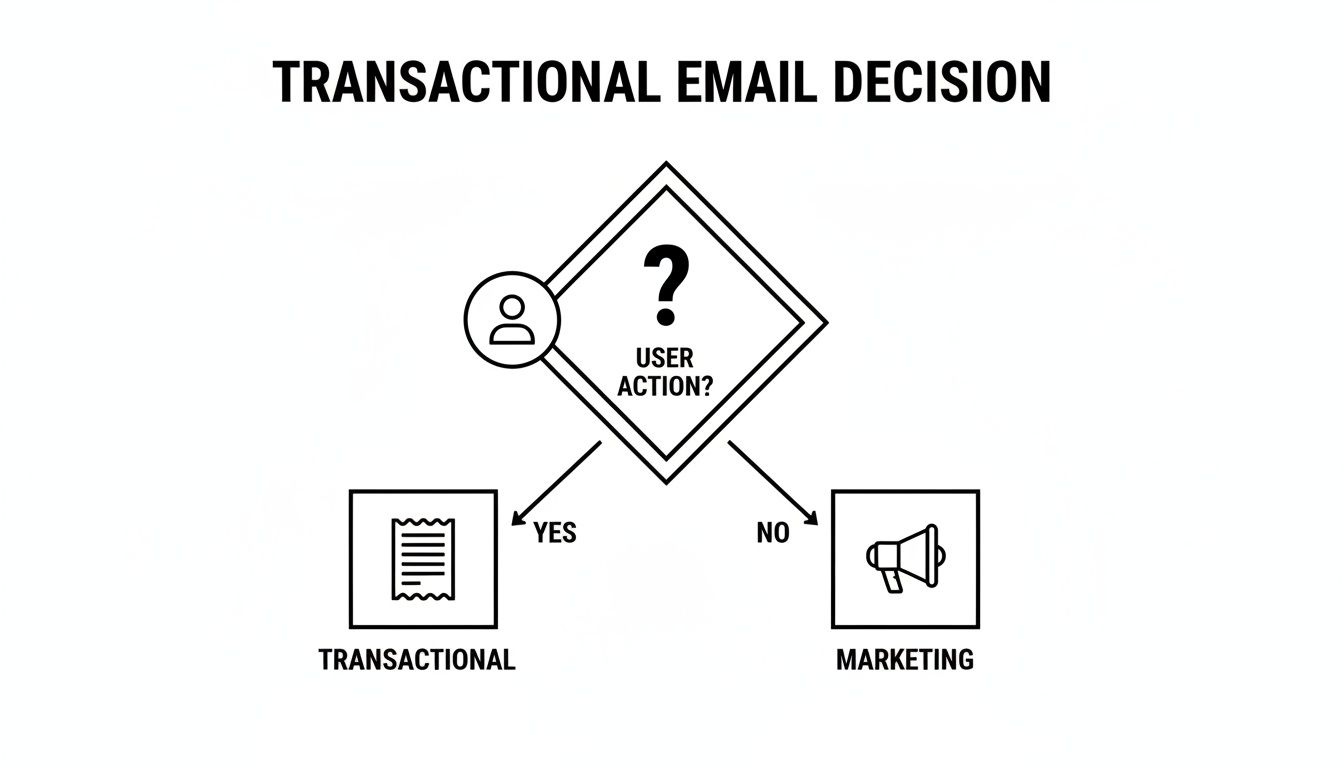
As you can see, that one branching point separates a necessary, one-to-one communication from a persuasive, one-to-many broadcast.
Avoiding the Trust-Destroying Hybrid
The single most dangerous mistake a B2B SaaS company can make here is blurring these lines. Trying to sneak a promotional message into a transactional email is the fastest way to obliterate user trust and torpedo your sender reputation. Users expect utility from these messages, not a sales pitch.
For example, when someone requests a password reset, that email should contain one thing: a password reset link. Tacking on a "special offer" or a "can't-miss webinar" announcement feels invasive and breaks the implicit promise of that email. Plus, email providers like Gmail and Outlook have very strict rules about this—get it wrong, and your most critical emails start landing in the spam folder.
"Sending a promotional message disguised as a transactional one erodes user trust and can severely damage your sender reputation. When a user asks for a receipt, they want a receipt—not an upsell. Respecting that boundary is critical for long-term customer relationships."
Ultimately, the distinction between transactional email vs marketing email comes down to intent. One serves the user's immediate need, reinforcing the idea that your service is reliable. The other serves your long-term business goals, aiming to build a deeper relationship. You absolutely need both, but they have to stay in their own lanes to work.
Analyzing Content Strategy and Personalization Tactics
The entire philosophy behind a transactional email's content is different from a marketing email's. It all comes down to function versus persuasion.
A transactional email is purely functional. Its content is defined by its utility—it needs to be direct, crystal clear, and focused only on the information the user is expecting at that moment. The best way to think about it is as an extension of your app's user interface. It just works.
Marketing emails, on the other hand, are built to persuade. The content is carefully crafted to grab attention, create desire, and push the reader toward a specific action, like signing up for a webinar or upgrading their plan. Here, the goal shifts from pure utility to active engagement, relying on compelling copy, eye-catching visuals, and a can't-miss call-to-action (CTA).
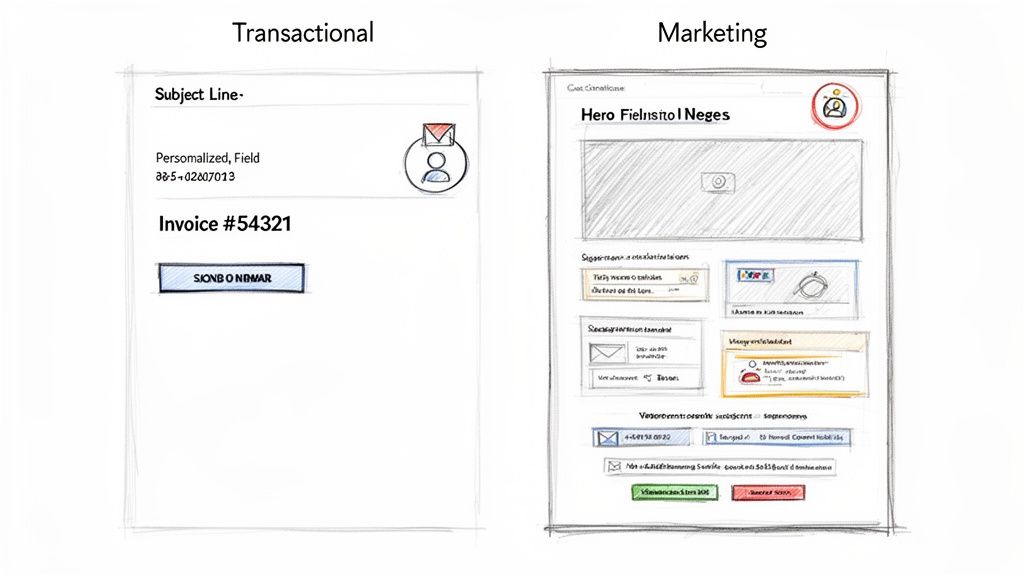
You can see the difference at a glance. Transactional emails are all about clarity, while marketing emails are designed to convert.
Personalization: Hyper-Specific vs. Segment-Based
Personalization is a must for both types of email, but how it's executed is worlds apart. This is where the transactional email vs marketing email distinction really becomes obvious.
Transactional personalization is hyper-specific, tied to an individual's real-time data from a single event. These emails contain unique details relevant to one person at one exact moment.
Order Confirmation: "Your order #98765 for the Pro Plan is confirmed."
Data Export Notification: "Hi Alex, your user data export from 2:15 PM is ready for download."
Billing Alert: "Invoice #INV-4321 for $299 is due on October 15th."
This kind of one-to-one precision is almost always handled by an API that pulls data directly from your application the instant an email is triggered.
Marketing personalization is completely different; it's segment-based. You're not personalizing for a single user's unique action but for the shared traits of a group. The idea is to make a broad message feel more relevant to a specific audience. We dive deep into this in our guide to achieving personalization at scale.
Common marketing personalization tactics look more like this:
Using Firmographic Data: Targeting users with a message about an integration relevant to their industry (e.g., "A new Salesforce integration for our sales tech users").
Leveraging User Behavior: Sending an email to a segment of users who tried a specific feature but haven't adopted it yet.
Dynamic Content Blocks: Showing different offers or case studies based on a user's subscription tier or company size.
A transactional email says, "Here is the specific thing you asked for." A marketing email says, "Based on what we know about you, here is something we think you'll value."
Crafting Content for Different Contexts
Given their different goals, the actual process of creating the content couldn't be more different.
For transactional messages, the copy has to be concise and impossible to misinterpret. The subject line should be purely descriptive and instantly recognizable, like "Your Password Reset Link" or "Receipt for Your Recent Purchase." The design is usually minimal, reinforcing your brand without getting in the way of the core information.
Marketing email content, however, demands a more creative touch. The subject line has to be compelling enough to stand out in a crowded inbox. The body copy often uses storytelling, social proof, and benefit-driven language to guide the reader to the CTA. Visuals—like product screenshots, GIFs, or custom graphics—are critical for breaking up text and making the content stick.
Ultimately, transactional content serves the user's immediate need for information, which builds trust through sheer reliability. Marketing content serves the business's need for growth by building relationships through value and persuasion. A truly successful B2B SaaS strategy needs to master both.
Navigating Legal Compliance and Consent
The line between transactional and marketing emails isn't just about strategy—it's a legal minefield. Getting it wrong can land you in hot water with regulations like GDPR in Europe and the CAN-SPAM Act in the U.S. These aren't just suggestions; they're strict rules with hefty fines, making compliance a non-negotiable part of your email strategy.
At the core of all these laws is one simple idea: consent. For marketing emails, the rule is crystal clear: you need explicit, provable permission before sending a single promotional message. That means someone has to actively opt in, and you must give them an easy way out with a clear unsubscribe link in every single email.
The Special Case of Transactional Email Consent
Transactional emails play by a different set of rules. Because they are a direct result of a user's action and necessary for them to use your service, consent is considered implied. When a user signs up, they're agreeing to receive essential communications needed to manage their account.
This implied consent covers the basics, like:
Password Resets: The user specifically asks for this, making it a required response.
Billing Notifications: Invoices, receipts, and payment alerts are a fundamental part of doing business.
Security Alerts: Notifying a user about a new login isn't just helpful; it's a critical security feature.
But here's the catch. This special status is fragile. The moment you start stuffing a transactional email with promotional content, you risk it being legally reclassified as a marketing email. If you don't have explicit marketing consent for that user, you're suddenly in violation. A small, helpful "You might also like..." link might fly, but a full-blown sales pitch is crossing the line.
For global B2B SaaS companies, failing to separate transactional and marketing emails is a huge legal and financial liability. One wrong email to a user in a regulated region can trigger a costly penalty.
Automating Compliance to Avoid a Mess
Trying to manage consent and keep these two email streams separate by hand is a recipe for disaster, especially as you scale. This is where your email platform becomes your most important risk management tool.
Platforms like SMASHSEND are built to enforce this separation by design. You can route all transactional sends through an API and handle marketing campaigns in a completely separate broadcast system. This creates a firewall, protecting your critical, high-deliverability transactional channel from any issues related to your marketing lists and their unique consent rules.
A smart platform also puts consent management on autopilot. When a user unsubscribes from marketing, the system should automatically honor that request for all future promotional sends while ensuring they still receive essential messages like invoices or security alerts. This automation is your first and best line of defense against human error and compliance headaches.
Ultimately, getting the legal side of transactional email vs marketing email right isn't just about dodging fines. It's about respecting your users and building trust. When you honor their consent, you're showing them you value their inbox, which is the foundation of any healthy, long-term customer relationship.
Protecting Deliverability and Sender Reputation
When it comes to your email strategy, separating your transactional and marketing messages is non-negotiable. Think of it like this: your transactional emails are VIPs with an all-access pass, while your marketing emails are trying to get in through the main entrance with everyone else. If you make them use the same door, your most important messages will get stuck in the crowd.
Transactional emails—like password resets and order confirmations—naturally see sky-high engagement. People expect them, wait for them, and open them immediately. This behavior builds a rock-solid sender reputation with Internet Service Providers (ISPs) like Gmail and Outlook, signaling that you're a trusted source.
But if you start sending lower-engagement marketing campaigns from the same IP address, you risk poisoning the well. A single promotional email with low open rates or a few spam complaints can make ISPs suspicious of everything you send. Suddenly, that critical password reset email gets flagged as spam. The user is locked out, frustrated, and their trust in you is shattered.
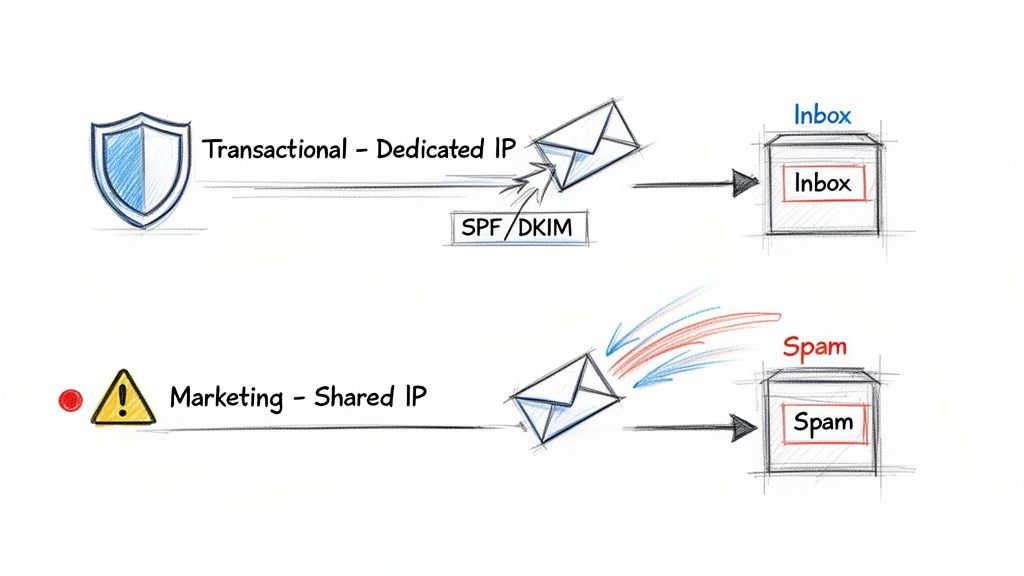
Why ISPs Treat Email Streams Differently
ISPs are constantly analyzing sending patterns to shield their users from spam. They see a steady, predictable flow of one-to-one transactional emails very differently from a massive, sudden blast of a marketing campaign. This distinction is at the heart of how they filter your mail.
Giving your transactional stream a dedicated IP address isolates your most vital messages. It ensures that all those great engagement signals from password resets and receipts directly boost a pristine sender score, maximizing their chances of hitting the inbox.
Meanwhile, your marketing emails can run on a separate IP without threatening your core communications. This separation lets you manage the reputation of each stream independently, which is absolutely crucial for your overall email program's health. If you want to go deeper, check out our complete guide on email deliverability best practices.
The Pillars of Email Authentication
Proper authentication is the other side of the coin. It works hand-in-hand with a separated infrastructure to prove to ISPs that your emails are legit and not forged by a scammer.
Three key protocols are the bedrock of modern email authentication:
SPF (Sender Policy Framework): Think of this as a guest list for your domain. It's a public record that lists all the IP addresses authorized to send emails on your behalf.
DKIM (DomainKeys Identified Mail): This attaches a unique digital signature to every email. The receiving server checks it to confirm the message hasn't been altered on its way to the inbox.
DMARC (Domain-based Message Authentication, Reporting & Conformance): DMARC is the enforcer. It builds on SPF and DKIM by telling servers what to do with emails that fail the check—either quarantine them or reject them completely.
Setting these up is a must for both types of email, but it's absolutely mission-critical for your transactional stream where every single message has to land perfectly every time.
Safeguarding your transactional channel isn't just a technical task; it's a core component of customer retention. When a user trusts that your critical communications will always reach them, they have more confidence in your entire service.
While transactional emails build trust through reliability, marketing emails are what drive long-term growth. They make up over 80% of most subscriber bases and aim for higher-value conversions. Unlike the 50%+ open rates of expected transactional emails, marketing campaigns hover around 20-28% globally, according to 2024 benchmarks. They need compelling visuals and CTAs just to stay above the 0.5%+ unsubscribe rates that can damage sender reputation.
This data is precisely why separation is key. The risk profiles and engagement patterns are worlds apart, and they demand isolated management to protect the integrity of your entire email program.
Building a Unified B2B SaaS Email Strategy
Knowing the difference between transactional and marketing emails is one thing. Actually putting that knowledge into practice is where the real growth happens. A unified strategy isn't about jamming everything into one tool; it's about creating a seamless customer experience where both types of emails work in harmony.
This means tearing down the data silos that so often keep your product and marketing teams from communicating effectively. The goal is to ensure your emails feel consistent, relevant, and timely, no matter why they're being sent. For B2B SaaS teams, this is how you turn your email program into a genuine revenue engine.
Let's get practical and break down how to build this system within a single, powerful platform.
Configuring Transactional Emails for Key User Actions
Transactional emails are the nuts and bolts of your SaaS app. They're the functional backbone that users rely on, so they have to be lightning-fast, dependable, and triggered with absolute precision.
Getting this right means connecting your application directly to your email service provider using an API or webhooks. This ensures messages are fired off instantly the moment a user takes a specific action.
Here are the core transactional workflows you absolutely must nail:
Welcome and Onboarding Sequences: The second a user signs up, an immediate API call should trigger their welcome email. This message needs to confirm their registration, outline the first few critical steps, and maybe even kick off a short sequence to guide them to that "aha!" moment.
Magic Links and Password Resets: There is zero room for error with security-related emails. You need to configure an API endpoint that sends a single-use login link or password reset instructions the moment a user asks for it. Reliability here is completely non-negotiable.
Billing and Subscription Notifications: Automate every single financial communication. This covers invoices, payment confirmations, and especially dunning emails for failed payments. These should be triggered directly by events from your payment processor, like Stripe or Chargebee.
A well-executed transactional email strategy makes your product feel more responsive and dependable. It's not just about sending information; it's about reinforcing the user's decision to trust your platform with their business.
A modern email platform needs to connect effortlessly with the tools you already use. This is what allows you to trigger emails based on events happening anywhere in your stack, from your CRM to your payment gateway.
This visual from SMASHSEND shows a sample of the integrations that make these kinds of automated connections possible.
Connecting your tools via integrations or webhooks is the secret sauce. It lets you automate hyper-specific and timely transactional messages based on what users are actually doing.
Building Effective B2B Marketing Workflows
While transactional emails keep the product experience running smoothly, marketing emails are what drive your strategic goals—think activation, expansion, and retention.
The beauty of a unified platform is that you can use the same rich behavioral data to power these campaigns. This makes them infinitely more effective than the generic email blasts of the past.
Here's a practical roadmap for building out your marketing workflows:
Develop a Lead Nurture Workflow: When a new lead signs up for a demo or downloads an ebook, get them into an automated sequence right away. This workflow should educate them on their problem, gently introduce your solution, and guide them toward a sales call or trial signup.
Segment Users Based on In-App Behavior: Start creating dynamic segments of users based on their actions (or lack thereof). For example, build a list of users who enabled a key feature but haven't touched it in 14 days. You can then target this specific group with an automated campaign offering best practices or a short tutorial video.
Design a Feature Announcement Campaign: Launching a new feature demands more than one email. Build a multi-touch campaign that teases the announcement, showcases the benefits on launch day, and follows up with use cases and customer stories. Most importantly, target this campaign to the user segments most likely to get value from the new functionality.
When you manage both transactional and marketing communications in one place, you get a 360-degree view of every single message a user receives.
This stops you from accidentally sending a promotional offer to a customer who just submitted a critical support ticket. It's about preserving the relationship and creating a truly cohesive experience. Suddenly, the distinction between transactional email vs marketing email becomes a strategic advantage, not a technical headache.
Frequently Asked Questions
Have a question not in here? Contact us
- Can a Transactional Email Include Marketing Content?
The short answer is yes, but you have to be incredibly careful. Legal frameworks like GDPR and CAN-SPAM treat transactional emails differently because they're a core part of your service. Slipping in a small, relevant promotional bit—like a link to a feature that complements the user's recent action—is usually fine. But here's the catch: the email's primary purpose must stay transactional. If your password reset email starts looking more like a newsletter, you risk it being reclassified as a marketing message.
- Why Do I Need Separate IP Addresses?
Using different IP addresses for your transactional and marketing emails is one of the most important things you can do to protect your sender reputation. Think about it: your transactional emails get fantastic engagement. People almost always open password resets and invoices. This signals to providers like Gmail and Outlook that you're a legitimate sender they can trust. That hard-earned reputation ensures your most critical messages always hit the inbox.
- Do I Need an Unsubscribe Link on All Emails?
Nope, but the rules are very clear. Every single marketing email must have an obvious and easy-to-use unsubscribe link. This isn't just a nice-to-have; it's a legal requirement under laws like CAN-SPAM. Transactional emails get a pass because they are necessary for a user to manage their account or use your service. You can't let a customer 'opt out' of receiving a receipt, a shipping notification, or a critical security alert for a service they're actively using.
- How Does This Affect My Overall Email Strategy?
Getting the transactional vs. marketing email distinction right is the bedrock of a solid email strategy. It's not just about compliance; it's about seeing the customer journey clearly. This forces you to consider the user's mindset and intent with every single message you push 'send' on. A truly great strategy doesn't see them as two separate channels but as two halves of a single customer conversation.
Ready to stop juggling platforms and build a unified email strategy that actually drives revenue? SMASHSEND brings together powerful automation, fast transactional APIs, and a smart AI editor into a single platform designed for B2B SaaS. See how SMASHSEND can help you scale your lifecycle communications.